


Flat Equalizer - Bass Booster
4.715.58K Reviews
App Specs
- Version
- 6.3.5.6
- Updated On
- License
- Free
- Downloads
- 10,000,000+
- Developer
- Beat Blend Labs
- Categories
- Music & Audio
- Platform
- Android, iOS
Screenshots
 Analysis by AppCompare
I usually reach for an equalizer when a familiar playlist sounds thin through one pair of headphones or boomy through another. Flat Equalizer - Bass Booster is aimed at that everyday problem: it gives you a way to shape playback on an Android phone without turning sound adjustment into a technical project. I’d treat it as a practical listening tool rather than a replacement for good headphones or carefully produced audio.
A small sound tool, with sensible expectations
Made by Beat Blend Labs, this free music and audio app has been around since March 10, 2018, and its current release is version 6.3.5. It has a 4.7 average from around 575,000 ratings and over 10 million installs, which suggests it has found a sizable audience among people who want quick audio adjustments. The Everyone age rating is also reassuring for a general-purpose utility, though it should not be mistaken for a statement about privacy or permissions.
That distinction matters to me. An audio enhancer can affect what I hear, but that alone tells me nothing about what information an app accesses or how it handles it. I avoid assuming that a familiar interface, a large audience, or a simple purpose automatically makes an app privacy-friendly. Before installing, I check the permission prompts Android actually presents and decide whether each request makes sense for the way I plan to use the app.
Make the first test a controlled one
When I try an equalizer, I start with a song I know well and make only one small change at a time. That gives me a better chance of hearing whether the adjustment helps, rather than mistaking louder playback for better sound. With Flat Equalizer, I’d first compare the default sound with a modest bass or treble adjustment, then switch the effect off and back on at the same listening level.
This simple routine is useful because boosting several ranges at once can make a track feel exciting for a minute but tiring over a whole commute. If vocals become muffled after raising the bass, I’d lower the bass before pushing the treble hard to compensate. The goal is not to make every slider dramatic; it is to find a setting that suits the headphones, the recording, and the volume I normally use.
Getting Started with Flat Equalizer - Bass Booster
First off, installing the app is a breeze. Available on both Android and iOS, you can easily grab it from your respective app store. Once you've got it installed, it’s time to dive into the world of sound customization. The interface is pretty sleek and straightforward, which is great because nobody wants to fiddle with a bunch of confusing settings just to get their tunes sounding right.
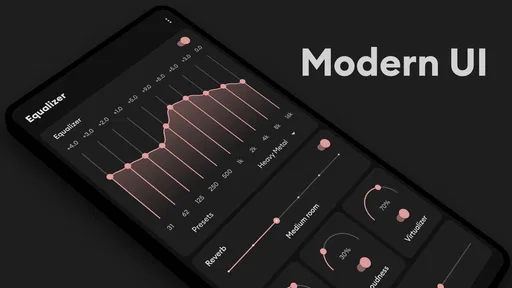
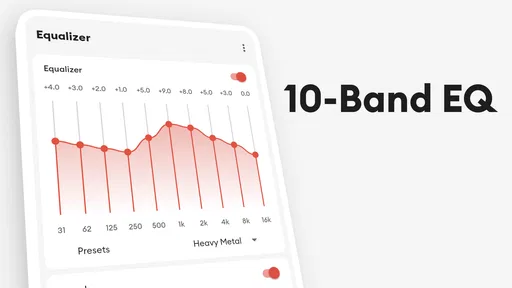
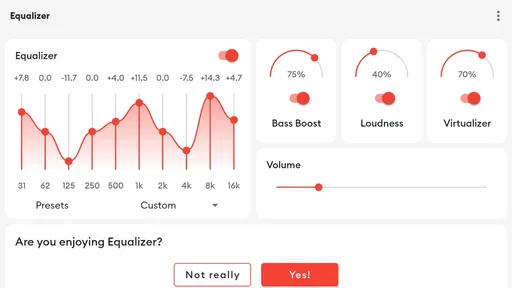
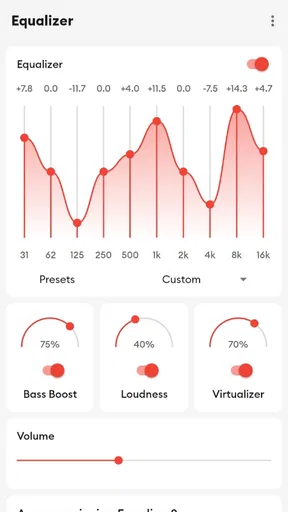
Upon launching, you’re greeted with a simple dashboard. The main attraction here is the equalizer, and it’s as user-friendly as it gets. You’ll find a series of sliders that allow you to adjust different frequencies. Whether you’re a bass head or someone who prefers crisp treble, there’s something for everyone.
Worth Reading Before You Choose

EA SPORTS FC Mobile 26 Is a Bigger Football Game, but It Takes Time

Flipboard Shows What News Apps Must Do Beyond the Feed

Switching to Android Auto Means Rethinking Your Driving Routine

Google Calendar Makes a Crowded Week Easier to Manage

Ludo King Makes the Most of the Minutes Between Plans

Baby Panda World Brings Quick Play to Modern Phones, but Its Game Library Feels Busy
Features that Rock
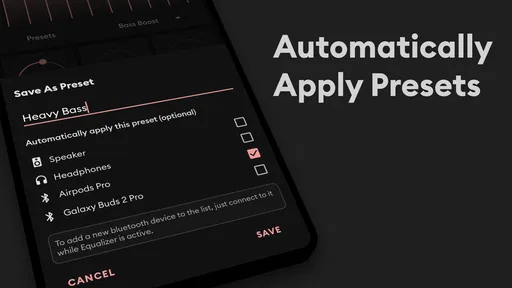
What really sets Flat Equalizer - Bass Booster apart is its versatility. The app comes with a variety of preset modes tailored to different genres such as rock, jazz, classical, and more. These presets are perfect for those days when you just want to hit play and enjoy your favorite tunes without tweaking every little detail.
But if you’re like me and love to tinker, the custom mode lets you craft your own sound profile. Want to crank up the bass to feel those beats in your bones? Go for it. Prefer a balanced sound for podcast listening? You got it. The app remembers your settings, so you won’t have to reset everything each time.
Boosting the Bass
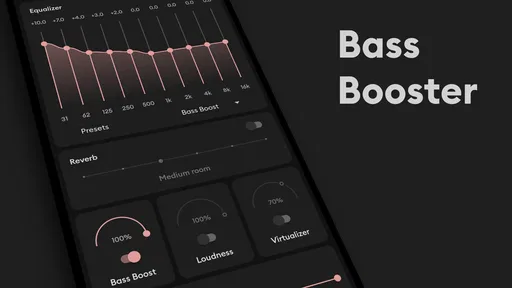
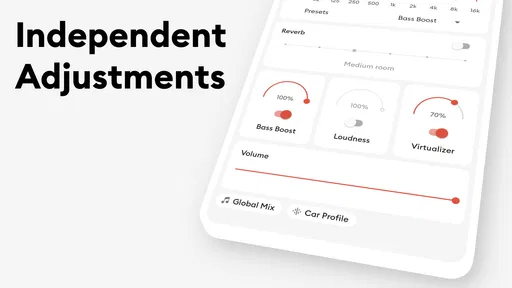
Now, let's talk bass. We all know that a good bass line can make or break a song. The bass booster feature in Flat Equalizer - Bass Booster is a game changer. It adds that oomph to your music, making it feel more immersive. It’s like having a mini subwoofer right in your pocket.
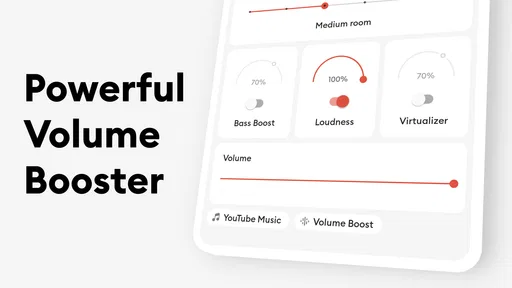
There’s this magical slider labeled "Bass Boost"—slide it up, and it feels like your headphones have transformed into a concert hall. It’s especially effective when paired with a good set of headphones. Just be careful not to overdo it, as too much bass can overshadow other elements in a track.
Everyday listening: where it helps, and where it doesn’t
A realistic use for this app is a noisy bus ride: I might reach for a familiar preset or make a slight adjustment to help a thin-sounding podcast feel fuller, then return to a more restrained profile when I’m listening to music at home. The useful habit is to make changes for the actual listening setup, not to chase one “perfect” curve for every speaker and recording. Earbuds, phone speakers, and over-ear headphones can respond very differently.
That flexibility is also a trade-off. Equalization can change the balance of sound, but it cannot restore detail that is missing from a poor recording, and bass boost cannot make small speakers reproduce deep bass cleanly. If a track distorts when boosted, I’d back off rather than keep turning up the effect. For someone who wants consistent, neutral playback, leaving the equalizer flat may be the better choice.
Presets, custom settings, and a useful listening workflow
Presets are a quick starting point, not a promise that a genre has one correct sound. Two rock tracks can have very different mixes, and a preset that gives one song more energy may make another harsh. I’d sample a few familiar tracks before settling on one, and keep a custom setting conservative enough to work across more than a single song.
For podcasts, spoken-word programs, and audiobooks, I’d focus on intelligibility rather than extra bass. If voices sound muddy, reducing low frequencies slightly can be more effective than boosting every higher band. When a preset or custom profile makes speech tiring, switch back and compare at the same volume; that quick A/B check is more reliable than judging from memory.
A practical detail is that the app’s remembered settings can save time, but they also make it worth checking what profile is active when you change headphones or switch from music to speech. I would not assume one saved adjustment suits every listening session. Keeping a simple “everyday” profile and using stronger changes only when they solve a specific problem helps avoid constant slider-tweaking.
How it compares with built-in sound controls
Many phones and music players already offer some form of sound adjustment. Those built-in controls are often the easiest choice if they cover what you need, since they keep the workflow within the player or system you already use. Flat Equalizer is more appealing if you want a separate place to experiment with frequency sliders and bass emphasis instead of relying on a basic preset menu.
The other alternative is a dedicated equalizer built into a music player or headphone companion app. That can be a better fit when you listen mostly through one service or one specific headset and want adjustments tied closely to it. A separate equalizer is more convenient for someone who prefers a general-purpose sound tool, but behavior can depend on the phone, player, and audio route. I’d test it with the apps and headphones I actually use before building a routine around it.
It is also worth separating playback controls from the source of the music. This app adjusts sound; it is not a music library or streaming service. If your main need is discovering songs, organizing a collection, or downloading audio, a music player or streaming app is the more suitable starting point. The equalizer makes sense as an extra layer for listeners who already know what they want to play.
Permissions, purchases, and choices I would check
I pay attention to permission prompts at installation and when an app asks for access later. I would grant only what Android explains and what I understand to be necessary for my intended use; if a request seems unrelated to adjusting playback, I would pause and review it rather than tap through automatically. Permission controls can also be revisited in Android settings, so the decision need not be permanent.
The app is free to install, with optional in-app purchases ranging from $0.99 to $99.99 per item. That broad range makes it sensible to look at the specific purchase screen before confirming anything, especially if you only want to try the basic equalizer. The published description of an ad-free premium option is a reason to inspect the app’s visible choices, not a reason to assume which features or terms a particular purchase includes.
For data-sensitive listening, I would also review the privacy information shown in the app store and the device’s own controls before deciding how comfortable I am. I do not treat an audio effect as proof that an app does or does not collect personal information. If you share a phone, check purchase confirmations and any account or device settings that affect who can make in-app purchases; that is a more useful safeguard than relying on a casual glance at the main screen.
Who is likely to enjoy it
I think this is most useful for listeners who already have music or podcasts they enjoy but want a little control over how they sound on different headphones. It can suit someone who likes quick presets on busy days and occasional manual adjustments at home. The low-friction approach is a plus if you are curious about equalization but do not want to learn audio engineering before making a modest change.
I would skip it if you are satisfied with your phone’s existing controls, need a guaranteed system-wide effect across every audio app, or want a fully documented privacy picture before installing any utility. It is also not the right tool if the real problem is uncomfortable headphones, a faulty speaker, or a recording that is already distorted. In those cases, changing the hardware, playback source, or listening volume is more likely to help than pushing the bass slider.
Why You’ll Love It
Aside from its sound-enhancing capabilities, the app is light on resources. It doesn’t hog your phone’s battery or slow down other operations, which is a huge plus. I’ve had apps in the past that were fantastic for sound but a nightmare for battery life. Thankfully, this isn’t one of them.
The app is also ad-supported, but the ads are unobtrusive. They don’t interrupt your listening experience, which is a relief. There’s an option to go ad-free with a premium version if that’s more your style.
Final Thoughts
All in all, Flat Equalizer - Bass Booster is a versatile app that enhances your music listening experience without any fuss. Whether you’re a casual listener or a music enthusiast, there’s something in it for you. It’s easy to use, highly effective, and doesn’t drain your phone’s resources. So why not give it a shot? Download it, play around with the settings, and let your music truly come alive.
My cautious recommendation is to try it with familiar tracks, keep the first adjustments small, and decide for yourself whether the change survives a longer listening session. I value the app most as a quick, hands-on way to shape playback—not as a fix for every audio problem or a substitute for checking permissions and purchase options. If that is the kind of control you want, it is worth considering; if you prefer untouched sound or want every part of the experience contained in a single music player, a built-in equalizer may suit you better.
Pros
- User-friendly interface for easy navigation.
- Customizable sound settings enhance experience.
- Supports a wide range of audio formats.
- Smooth integration with streaming services.
- Minimal impact on device battery life.
Cons
- Contains ads that might interrupt use.
- Limited free features; premium needed for more.
- Occasional lag on older devices.
- Requires internet for some features.
- No widget support for quick access.
FAQs for Flat Equalizer - Bass Booster
What is Flat Equalizer - Bass Booster and how does it enhance my audio experience?
Flat Equalizer - Bass Booster is an audio enhancement app designed to improve your listening experience on mobile devices. By allowing users to adjust sound frequencies, it offers a customizable equalizer with bass boosting capabilities. This means you can amplify low-end sounds for a richer, deeper audio output, ideal for music lovers.
Is Flat Equalizer - Bass Booster compatible with all music and audio apps on my device?
Yes, Flat Equalizer - Bass Booster is designed to work seamlessly with most music and audio apps on Android and iOS devices. It integrates with your phone's audio output, enhancing sound quality across various platforms, including streaming services, music players, and video apps.
Does using Flat Equalizer - Bass Booster significantly drain battery life?
While Flat Equalizer - Bass Booster is optimized for minimal battery consumption, any audio enhancement app can have a slight impact on battery life. However, the app is designed to efficiently use resources, ensuring that the performance boost outweighs any additional battery usage.
Can I customize the equalizer settings to suit different music genres?
Absolutely. Flat Equalizer - Bass Booster provides a range of preset options tailored to various music genres such as rock, jazz, classical, and pop. Additionally, users can manually adjust the equalizer sliders for a personalized sound profile, catering to individual listening preferences.
Is there any cost associated with downloading or using Flat Equalizer - Bass Booster?
Flat Equalizer - Bass Booster is free to download with optional in-app purchases. These purchases may unlock additional features or remove ads. Users can enjoy the core functionalities at no cost, but can choose to enhance the experience through premium options if desired.


